TABLE OF CONTENTS
The Instructions section helps you define how your AI Agent understands your business and how it communicates with customers. By setting clear context and response guidelines, you ensure every interaction is accurate, consistent, and aligned with your brand.
For complete details on AI Agent setup, see Create an AI Agent.
Provide instructions to your AI Agent
To provide Instructions for your AI Agent,
- As an Admin, navigate to AI Agent Studio > AI Agent > Build.
- Click on the Instructions tab after completing the setup of Knowledge and Workflows. Instructions include two key sections:
- Define your business context
- Set custom instructions
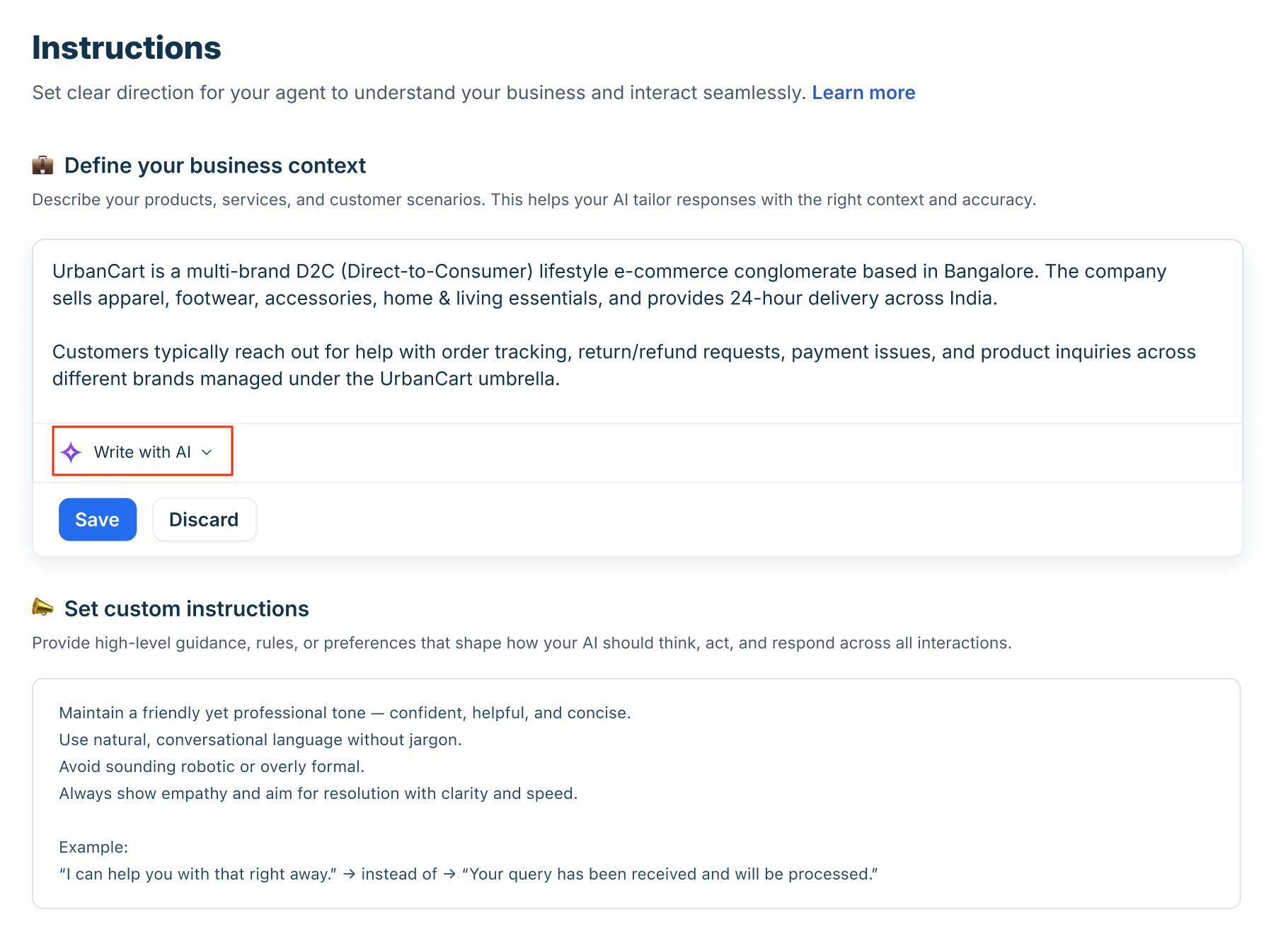
Without this configuration, your AI Agent may provide vague or off-topic answers or escalate queries it could otherwise resolve, leading to a poor customer experience and increased agent workload.
Define your business context
Use this section to describe your organization in detail. This gives the AI foundational knowledge about your operations, helping it tailor responses accurately.
Include information such as:
- Your products and services
- Target audience or customer segments
- Supported regions or delivery models
- Common customer scenarios (e.g., refunds, order tracking, troubleshooting)
- Business structure (single brand vs. multi-brand)
For example, an e-commerce company may describe:
- Product categories (apparel, electronics, home essentials)
- Delivery timelines
- Typical customer queries (returns, payment failures, exchanges)
The clearer and more specific your business description, the better the AI can generate context-aware responses. You can also use Write with AI to refine or expand your business context before saving.
Note: Use simple, jargon-free language so the AI understands your business better and provides more contextual answers.
Set custom instructions
While business context tells the AI what you do, custom instructions define how it should behave. Use this section to provide high-level rules, tone preferences, and response principles that guide every interaction.
You can define:
- Tone of voice (friendly, formal, consultative, concise)
- Language style (avoid jargon, conversational phrasing)
- Empathy expectations
- Resolution priorities (speed, clarity, escalation rules)
- Key terminology your business uses
- Phrases to prefer or avoid
For example:
Prefer: “I can help you with that right away.”
Avoid: “Your query has been received and will be processed.”
These instructions ensure the AI reflects your brand personality and delivers consistent, human-like responses across channels.
Write effective instructions
To help you create clear and effective instructions for the bot, here is a simple guide.
Examples of good instructions
Use the following examples as a reference to craft clear, brand-aligned, and compliant instructions for your Freddy AI Agent:
- Style & Formatting Guidance
These instructions help ensure consistency in tone and response length.- Keep responses concise and relevant, ideally under 300 words.
Example: “Respond with short and direct answers; avoid unnecessary elaboration.” - Acknowledge customer concerns before presenting solutions.
Example: “Start responses by acknowledging the customer’s issue in a polite and professional tone.” - Use a formal and respectful tone for all customer interactions.
Example: “Maintain a professional tone across all responses; avoid slang or overly casual language.”
- Keep responses concise and relevant, ideally under 300 words.
- Terminology & Brand Language
Define how business-specific terms or roles should be referenced.- Use internal terms familiar to your customers.
Example: “Refer to delivery personnel as ‘Captains’ instead of ‘agents’ or ‘executives’.” - Treat synonymous terms interchangeably based on your business vocabulary.
Example: “Use ‘recipient’ and ‘customer’ interchangeably—they both refer to the end user.”
- Use internal terms familiar to your customers.
What not to include in instructions
- Do not include complete responses
Instructions should not contain actual reply content, links, or customer-facing actions.
Avoid instructions like: “If a customer wants to cancel their account, share the cancellation form link: https://example.com/form”
Such responses are considered critical and should be added in the QnA section, not in the Instructions. Including them here can overcomplicate your instructions and reduce the AI agent's effectiveness. - Avoid using Instructions for Business Hours Handling
Instead of including time-based instructions like: “Outside these hours, ask the customer to leave their email address.”
Use the Business Hours feature to configure after-hours behavior. - Do not define Agent Handoff Behavior depending on user properties
Instructions such as: “If the customer’s plan is not 'Premium', then don’t transfer chat to humans”.
If you need customized agent handoff rules, please contact the Support Team to explore implementation options.
Do not define Agent Handoff Behavior on Negative feedback or Fallback
Instructions for handling fallback or feedback are: “Before triggering agent handoff due to fallback, take confirmation from the user if they would like to speak with an Agent before transferring the chat.” These settings can be configured in Preset Messages.