Use the Bot errors dashboard to identify, investigate, and troubleshoot errors that occur during bot execution. The dashboard provides real-time visibility into bot errors, helping administrators improve bot reliability and customer experience.
Prerequisites
- Ensure that you have permission to view bot analytics.
- Ensure that the bot is published and has processed conversations.
Understanding bot errors
Bot errors can occur when a bot encounters issues during execution. For example, an API request may fail, a function may receive invalid input, or a dialog may be incorrectly configured.
These issues typically occur at the dialog level and can interrupt the customer experience.
The Bot errors dashboard provides a centralized view of recent errors for an individual bot. It helps administrators identify the affected flow or dialog, understand the error type, and resolve issues more efficiently.
Access the bot errors dashboard
To view bot errors for a bot:
- Go to AI Agent Studio > Chatbots.
- Select the preferred chatbot
- Select the required bot.
- Open the Analyze tab and select Bot errors.
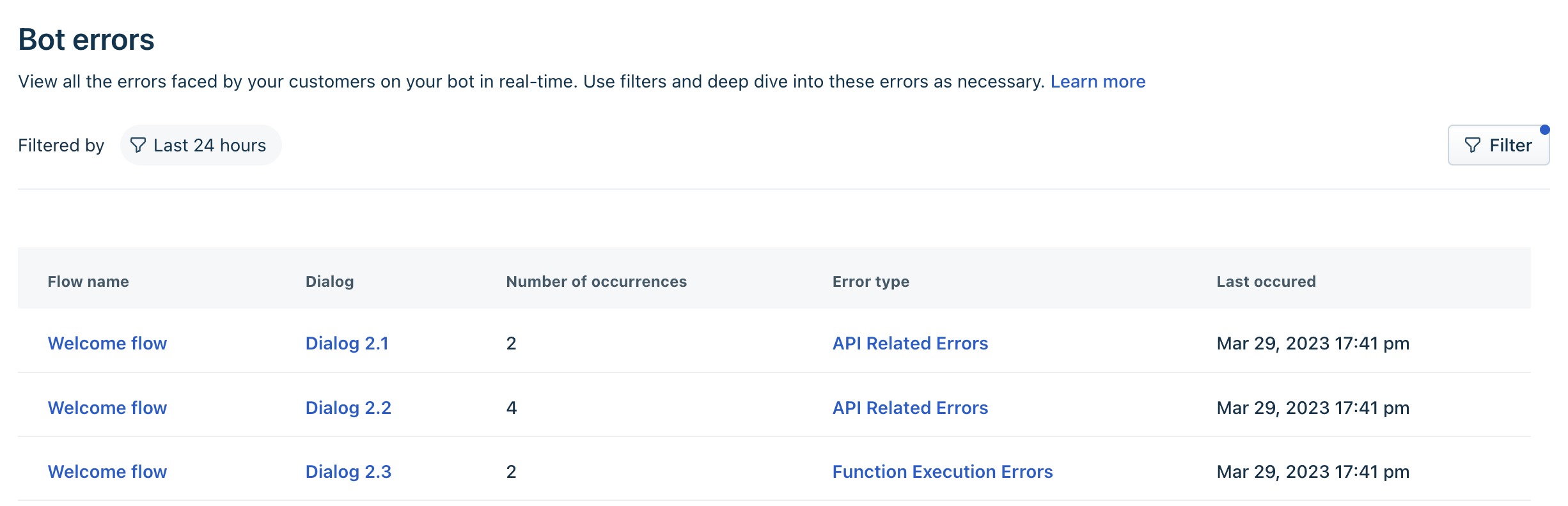
The dashboard displays bot errors in real time. Each error includes the following information:
Information | Description |
Flow name | The bot flow in which the error occurred. |
Dialog | The dialog associated with the error. |
Bot errors | The number of times the error has occurred. |
Error type | The category of the error. This includes:
|
Last occurrence | The most recent time the error occurred. |
Filter bot errors
Use the available filters to narrow down the displayed errors.
Filter | Description |
Time | View errors from the current hour, last 6 hours, last 24 hours, last week, or a custom time range. A custom time range supports up to seven consecutive days within the last 30 days. |
Dialog | Display errors for a specific dialog. |
Error type | Display errors for a specific error category. |