TABLE OF CONTENTS
This article details the Voice AI Agent integration with Freshcaller, highlights its benefits, and provides instructions for installing third-party voice applications in Freshcaller.
Overview
Voice AI agent integration in Freshcaller enables customers to have an intelligent conversational voice assistant that empowers businesses to deliver seamless round-the-clock phone support.
Powered by advanced AI technologies, Voice AI Agents can perform the following tasks:
- Automatically answer incoming customer calls without human intervention
- Engage in real-time conversations that feel natural and responsive
- Understand and interpret customer intent throughout the conversation
- Deliver instant human-like responses that provide relevant information and guide customers
With this Integration, businesses can streamline support operations, improve agent productivity, and enhance overall customer satisfaction.
Industry use cases
Voice AI Agents can be configured to support a range of scenarios across different industries. The following table provides common use cases.
Industry | Use case |
Logistics and supply chain management | Provides callers with real-time updates on order status, shipment tracking details, and expected delivery timelines. |
E-commerce and retail | Allows customers to place new orders, modify existing orders, or cancel orders through a voice interaction without requiring a live agent. |
Education | Interacts with callers in multiple languages and switches languages based on the caller’s preferred language or region. |
HR team | Collects required details, such as employee information and the purpose of the call, before routing the request to the appropriate team. |
Key benefits
A few benefits of implementing Voice AI Agents are:
Instant 24/7 phone support: Automatically answers incoming calls anytime, ensuring no calls are missed, during or outside business hours.
Reduce long call wait time: Voice AI Agents can handle multiple calls simultaneously, reducing wait queues and helping customers faster without the need to hold for a human agent.
- Natural language processing: Instantly initiates human-like conversations, understands customer queries, and responds in natural language.
- Intelligent call deflection: Quickly transfer calls to a live agent if it cannot handle the query.
- Automated call summary: Automatically generates a call summary while deflecting calls to live agents, providing them with a complete call context before answering customers' questions.
Understanding the Voice AI Agent workflow
The Voice AI Agent workflow includes the following essential steps:
- Creating and configuring the Voice AI Agent
- Configuring Voice AI Agent handover call flow
Configure Voice AI Agent
Freshcaller integrates with Voice AI platforms such as Synthflow and Squawkvoice. You can install any of these apps from the Freshcaller Marketplace. You can build, train, and deploy AI Agents based on your business requirements.
For example, an airline travel agency can configure a Voice AI Agent to:
- Book and cancel flight tickets
- Check ticket status
- Answer questions about cancellation or baggage policies
Configure Voice AI Agent handover call flow
Voice AI Agent handover call flow defines when and how the Voice AI Agent should transfer a call to a live agent. For example, if the Voice AI Agent encounters queries it cannot address, or if the customer requests to speak to a live agent, the call flow can be configured to route the call to your live agents or team.
After you create and build the Voice AI Agent in the third-party app, you must configure the agent handover flow in Freshcaller to enable call deflection.
Workflow
The following is the sequence followed in a Voice AI Agent workflow:
- A customer calls a Freshcaller number associated with a Voice AI Agent.
- The Voice AI Agent answers the call and engages in real-time voice conversation similar to any live agent. It understands the query and provides instant responses.
- If the Voice AI Agent cannot resolve the query, the call is routed to any live agent based on the Voice Agent Handover call flow settings.
The following diagram illustrates the complete call workflow from the moment a customer dials the number until the issue is resolved, either by the Voice AI Agent or by a live agent.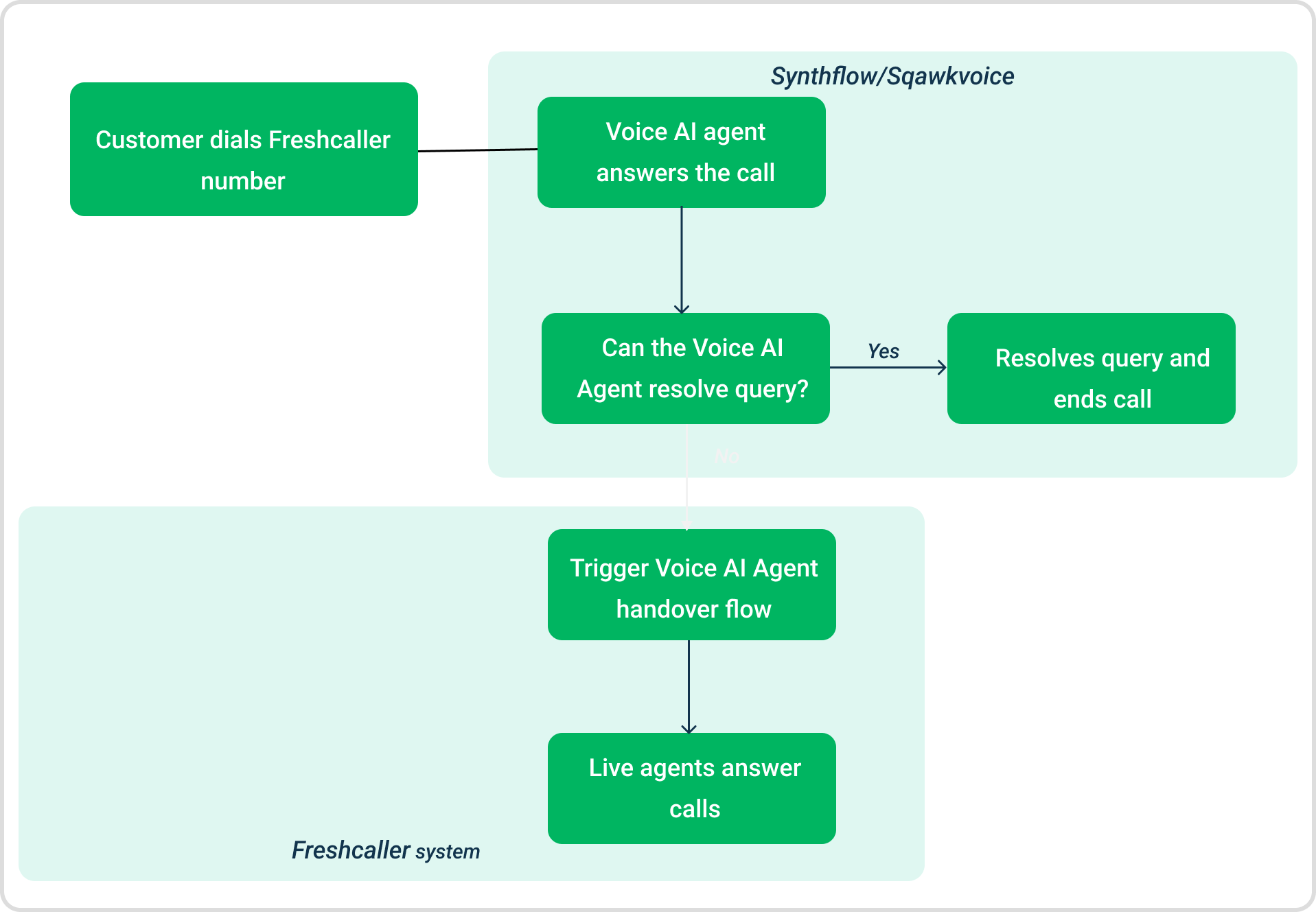
Voice AI Agent pricing details
Voice AI Agent integration includes the following cost components:
- Voice AI platform charges
Freshcaller integrates with third-party Voice AI platforms such as Synthflow and Squawkvoice. The charges are:- The Voice AI usage charges are billed directly by the selected vendor.
- Pricing depends on the vendor plan you have subscribed to.
- The charges apply only for the duration the Voice AI Agent handles the call.
- Freshcaller charges
Freshcaller charges apply for the entire duration of the call until the phone line is active.- The charges are deducted from your Freshcaller credits.
- Freshcaller call charges continue even if the call is transferred from the AI agent to a live agent.
Example
For a 10-minute call, where the first 6 minutes are handled by the Voice AI Agent and the remaining 4 minutes are handled by a live agent after transfer, the charges will be as follows:
- Freshcaller charges apply for the full 10 minutes (deducted from Freshcaller credits).
- Voice AI charges apply only for the first 6 minutes and are billed directly by the selected vendor.
This ensures transparent and separate billing for telephony usage and Voice AI platform services.
Install third-party Voice AI apps
To begin setting up Voice AI Agent Integration, install either the Synthflow or Squawkvoice app from Freshcaller Marketplace.
To install the app:
- Log in to Freshcaller as an admin.
- Go to Admin Settings > Marketplace and Integrations > Marketplace Apps.
- Search for Synthflow or Squawkvoice. You can use any of these apps.
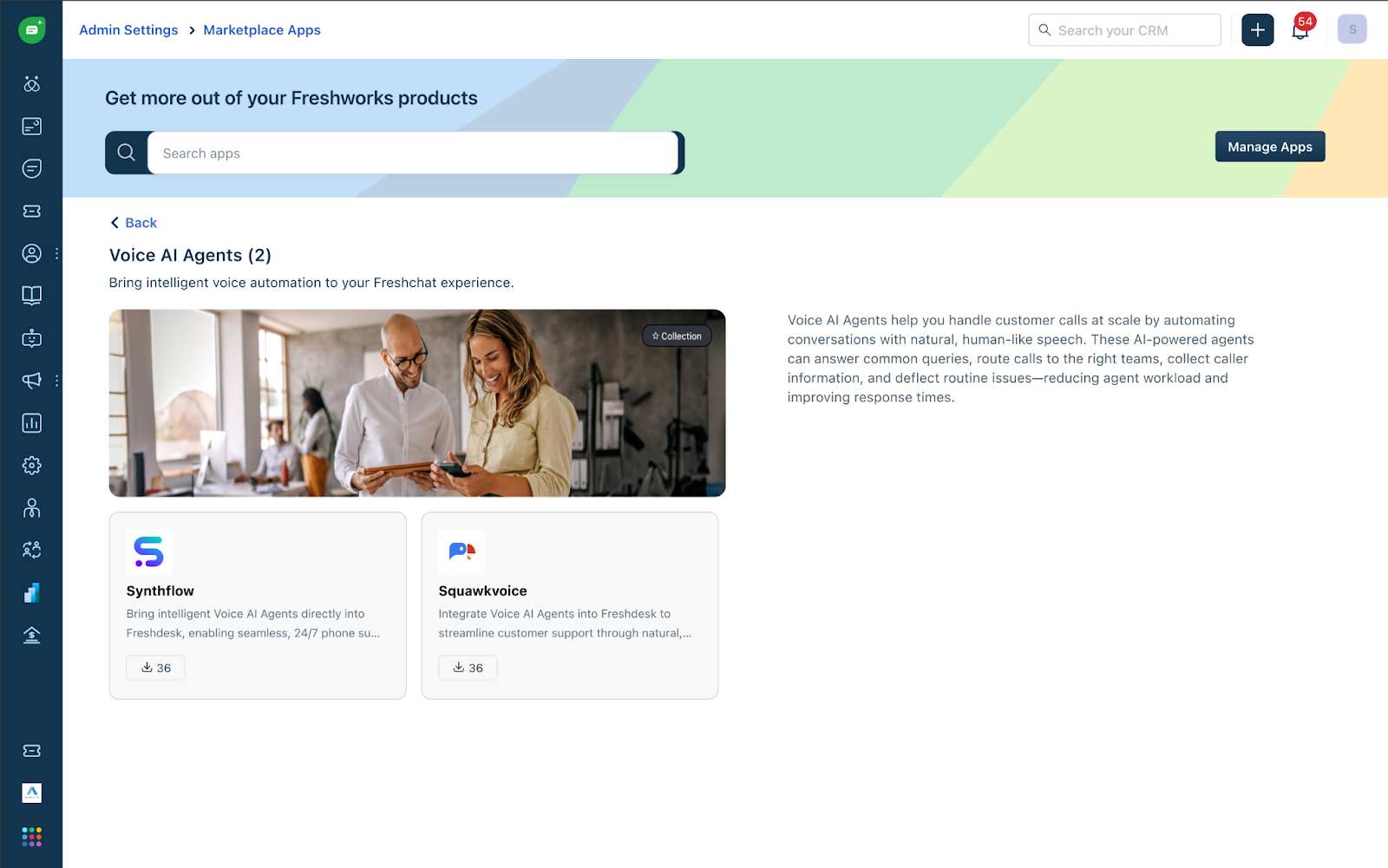
- Click Install.
- Enter the API key and the Domain, and click Verify. For instructions, see Find your API Key.
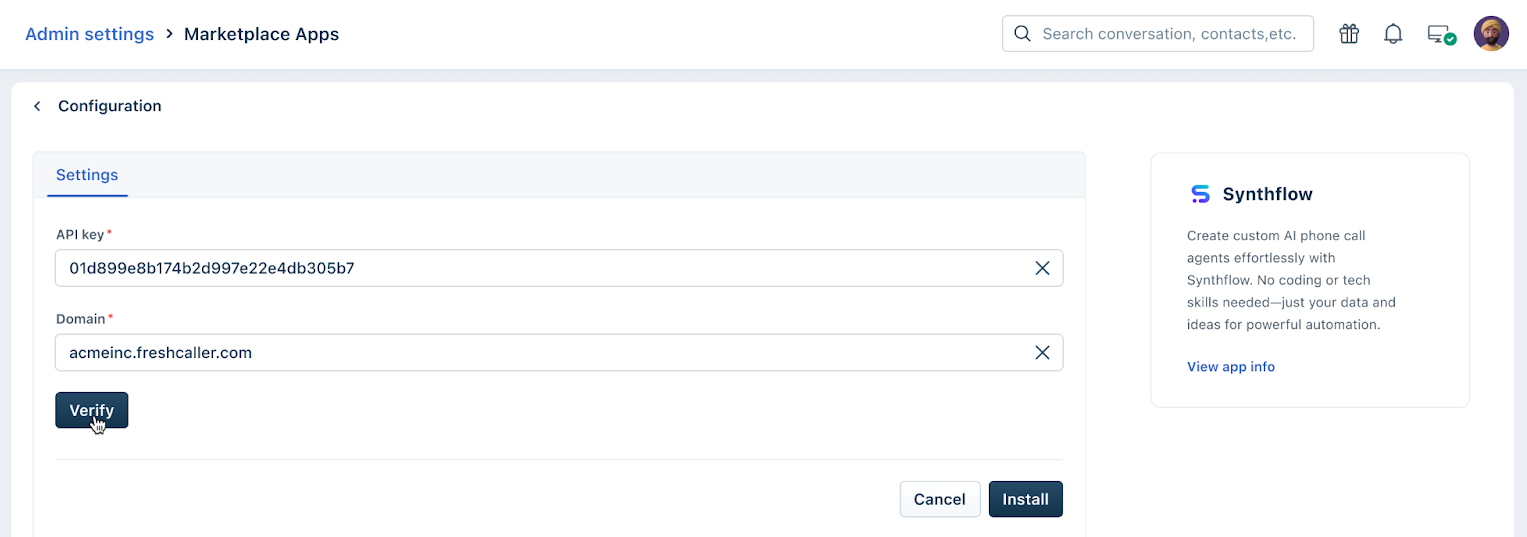
- Click Install again.
After successful installation, you can open the Synthflow or Squawkvoice app from Freshcaller and create Voice AI Agents.
Find your API Key
- Click on your profile icon in the top right corner.
- Click Personal Settings/Profile settings, switch to the API tab.
- Complete the Captcha Verification.
- Scroll to the bottom to find API DETAILS FOR PHONE.
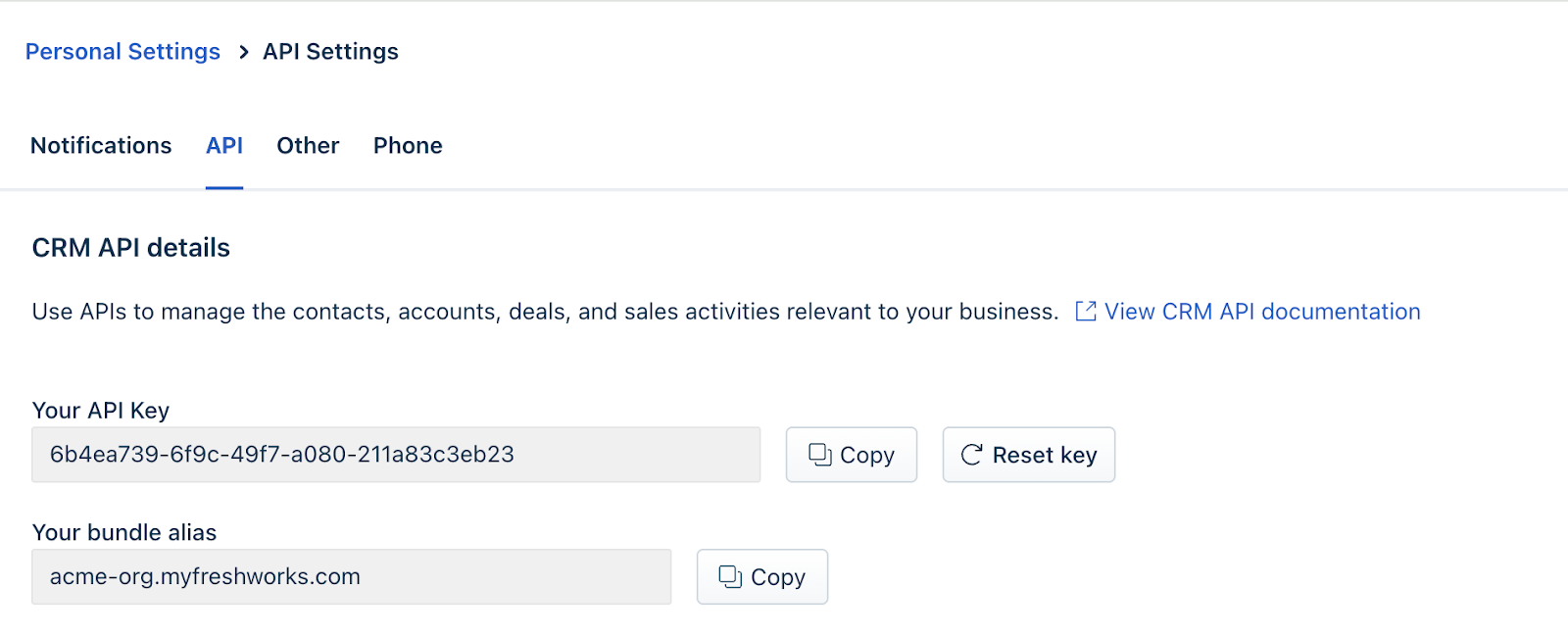 This is the API you will need. (On certain versions of Freshcaller, you will find the API key directly in the profile settings)
 - The Domain will be your Freshcaller URL.
Next steps
- After installing the Squawkvoice or Synthflow app, create and configure the required Voice AI Agents in the apps based on your business requirements. You can choose any of these apps.
- Configure the Voice AI Agent handover call flow in Freshcaller to define routing rules. For detailed instructions, see Configure Voice AI Agent handover call flow.